

Starting a career in content writing as a beginner can be challenging but nonetheless, it’s super exciting. For beginners, it can be intimidating because there are so many things to manage at once, and they are constantly comparing the content they write to Shakespeare to make it worse.
Unfortunately, there aren’t any tools I can recommend to help you stop comparing yourself to the most iconic and prolific authors of all time, but I do have a list of tools you can use to speed up and improve the efficiency of the writing process. I’ll list each tool along with the stage of content writing where it can be applied.
Don’t forget that they are also free!!
Stage #1 – You want to find a tool to look for ideas
Recommended Tool – Contentideas.io
You’ve made the decision to write a blog post about a particular subject and now you are considering what to say and how to say it. What if there was a way to see what content the world is sharing about that subject? Well, there are plenty of ways and contentideas.io is one of them.
It is a solid free content discovery and research tool that identifies content ideas and opportunities by analyzing content from across the web.
Let’s say you have decided to write about Capybaras. You are interested in seeing the things the world is currently talking about Capybaras and you are also looking for ideas to get your creative juices flowing. The best part is, all you have to do is go to contentideas.io’s homepage and type “Capybara” into the search bar in their fluid user interface. You will be met with plenty of top-performing content and you can filter accordingly until you find what you are looking for. Pretty cool isn’t it!?

Stage #2 – You want to conduct keyword research
Recommended Tool – Semrush
Okay, let’s assume you came across some high-quality resources on Capybaras and now you are interested in writing a full-blown article on Capybaras. ( Just in case you actually end up writing about Capybaras, please don’t forget to tag me)
Since you have got the topic, now it’s time to start writing about it, isn’t it? well, not at all!
Jumping straight into the content writing process after deciding on a title would be a great content writing approach if you don’t want anyone in the world to ever find what you are writing.

We use search engines to find content on the internet. Therefore before we start writing our content, it’s highly advised to see what people are looking for on capybaras using search engines. In this way, we can learn about what kind of questions people ask search engines about Capybaras.
We have to use a keyword research tool and it’s a tool that tells us how many people are looking for something using their search engines. We call the words and phrases users put into search engines “Keywords” and in this case, our keyword is going to be “Capybara”.
There are numerous free keyword tools available, and one of the most well-known and proficient premium keyword tools in the content writing world is Semrush. it has a free version that will undoubtedly assist you in locating the needed information and making your content writing process search engine optimized and discoverable.
All you have to do is use their keyword overview tool to see what people are looking for when they search “Capybara,” and you’ll get an idea of the level of interest your potential readers already have.

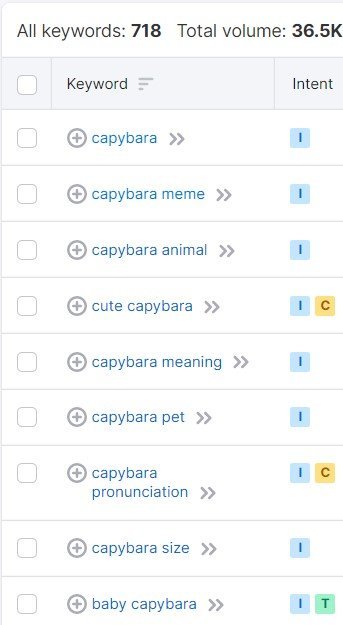
These keyword suggestions will help you understand what kinds of questions your fellow capybara enthusiasts are asking. Including those keywords in your content properly and subtly will help search engines understand what your content is about.
Following SEO guidelines are heavily advised and if you are interested in learning more about SEO, check How to Search Engine Optimize Your Blog Content by Hubspot.
I explained keyword research on a surface level because this post is about demonstrating the importance of using this tool, and if you want to learn how to conduct extensive keyword research, How to Use Semrush for Keyword Research by Semrush will help you.
If the Semrush keyword tool feels out of place, don’t forget to check out other free keyword research tools as well!
Make sure to incorporate keywords in a subtle and purposeful manner when writing content. Your content may be removed if you add keywords solely for SEO purposes without considering the benefits readers will receive.
Content writing is all about writing for humans, don’t forget that fellow human!
Stage #3 – You are looking to carry out content writing without any grammatical, or syntax errors
Recommended Tool – Grammarly
When it comes to content writing, mistakes cannot be tolerated. However, since making mistakes is part of being human, we should at least be aware of them when they happen so we can address them right away. There are numerous content writing tools available to ensure that we won’t make any silly typos that would diminish our content’s value and presentation, and Grammarly is one of them.
Grammarly is a writing assistant that we can use to check for spelling, grammar, and punctuation mistakes, as well as to improve our vocabulary usage. Grammarly is a great free content writing tool to ensure everything we write will be proper. If you make a minor grammatical error, it will recognize it and highlight it by drawing a red line under it so you can correct it right away!
The best part is that Grammarly’s free version offers enough features to guarantee our writing will be error-free and it will make your content writing process much smoother and more prolific.
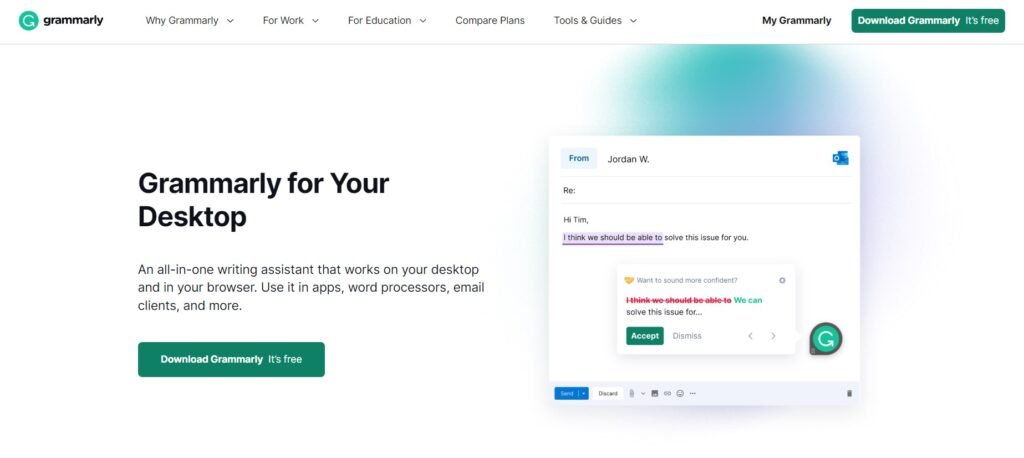
You can try the premium version if you are up for it!

Stage #4 – You want to change the direction of a sentence.
Recommended Tool – Quilbot
Quilbot is a paraphrasing tool that can help you untangle sentences that you’ve written. If you are a content writer who is constantly writing content, it is expected to write wobbly sentences here and there. When such things happen, you can add that sentence to quilbot and see if there’s another direction that you can drive your content towards.
I wouldn’t recommend you this unless you are at a complete loss for an approach because when it comes to content writing, the efforts you put in sharps your skills and if you find shortcuts around it, you may not reach your full potential as a writer.
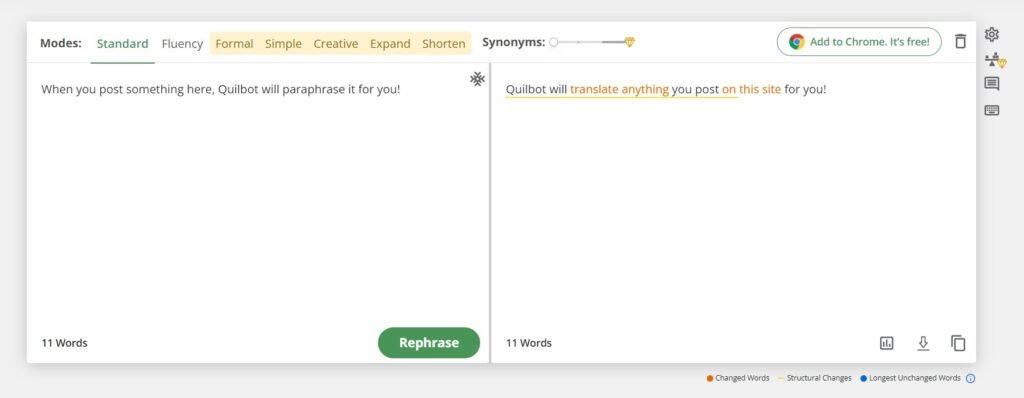
As an algorithm created to arrange words in the right order, Quilbot primarily produces flat content, so make sure to read everything you receive from it before using them.
Stage #5 – You want to ensure what you have written is properly SEO optimized
Recommended Tool – Yoast SEO
We discussed the importance of SEO in content writing, and now it’s time to ensure that what we have done is properly optimized.
Yoast SEO is one of the popular and free tools that we can use to judge how well-optimized the content is. Yoast SEO conducts several analyses to determine how optimized your content is in relation to various ranking criteria. It looks for a variety of factors, including the number of times your key phrase appears, the length of your text, the presence of internal links, etc.
Yoast SEO works like traffic lights. If it’s Green, then you are good to go because you have successfully optimized your content. Orange and Yellow indicate that you need to slow down and reconsider your optimization. If it’s red, you need to hit the brakes right away because your content isn’t optimized and you need to rethink your content writing priorities.
You have to perform this procedure until Yoast SEO is giving the green color and you will have a highly optimized blog post ready to be employed at the end of this process, waiting to be found by search engines across the globe.
Stage #6 – You want to make sure your writing is easy to read.
Recommended Tool – Hemingway Editor
Is your content ready to be published because it has been thoroughly researched and SEO optimized? The answer would be yes if you specifically wrote the content piece for robots.
Since content writing is all about writing for humans, it’s critical to understand how readable and user-friendly our content is and the Hemingway app is a great tool to measure it. Hemingway app focuses on spotting grammatical mistakes, the overuse of weak adverbs, the overuse of the passive voice, and other common mistakes that detract from the quality of your prose.
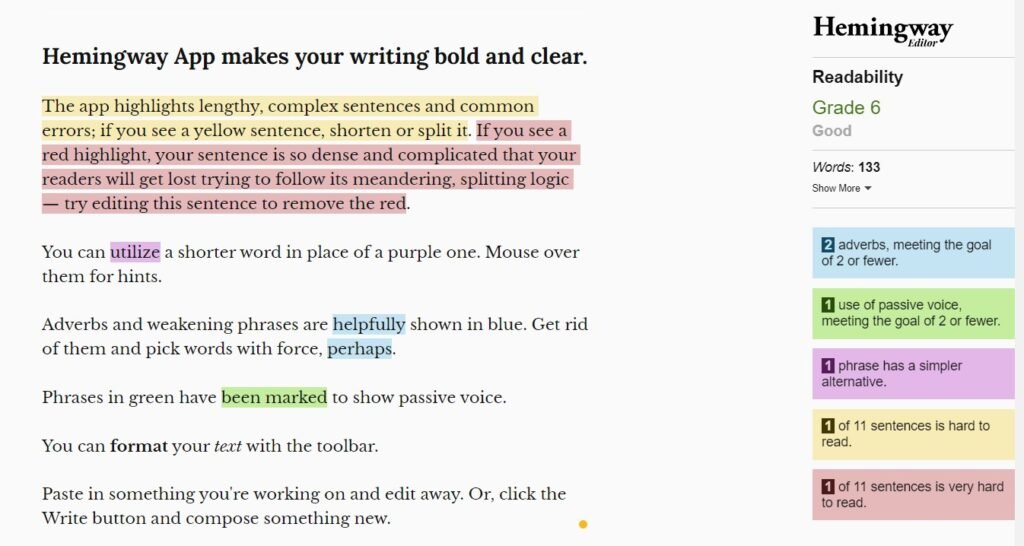
The Hemingway Editor’s readability score indicates the level of education required to comprehend the written content, and you will be assigned a grade ranging from 1 to 10 based on how well you perform in each of the above-mentioned criteria.
Always aim for a lower grade for greater readability, and any grade below 9 is considered good!
