

If you want people to easily find your content through search engines, adhering to proper SEO practices is critical.
The three main components of SEO—on-page SEO, off-page SEO, and technical SEO—are equally crucial for raising the ranking of our websites and pages in search results.
What is technical SEO?
The more you make the lives of your users easier, the higher your brand/product will rank in search results.
There are many ways you can make your users’ lives easier and Technical SEO is the process of improving a website’s infrastructure and architecture to provide website users with a great overall experience.
Technical SEO commonly focuses on site speed, mobile friendliness, indexation, crawlability, and the overall structure and organization of a website.
Do you know how search engines find your content?
First they “Crawl”
When you publish something on the internet, the search engines will want to know what you published. Therefore, The search engines will request the published web pages from the website’s servers and this discovery stage unfolds under “Crawling”.
The data collection tools search engines use to make these requests are commonly called Spiders or Crawlers.
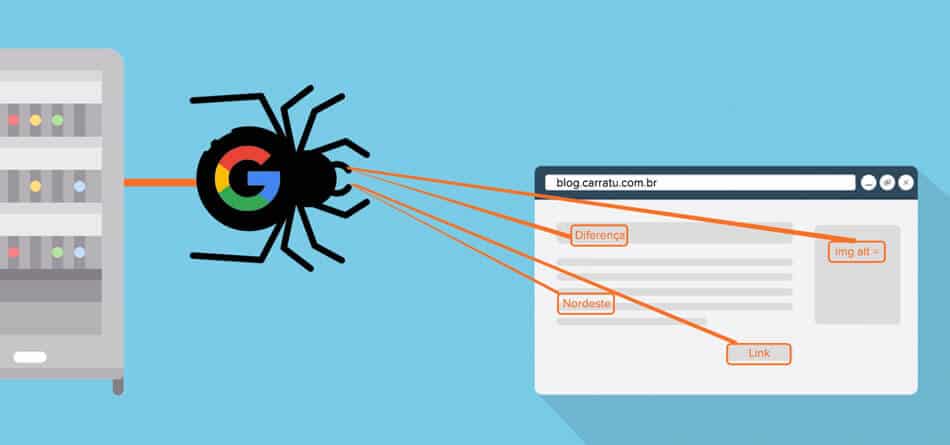
“Indexing” seals the deal.
After the Spiders are done crawling your website, they decide whether your web page is worthy of or not. If it’s worth it, the spiders will save your webpage in a database for easier access and this process is called “Indexing”.
There are many steps that go into this process and this Ultimate Guide to Indexing SEO by Onely will help you understand the process much better.
Let the “RANKING” begin!
When a search engine has compiled a list of all the web pages linked to a specific keyword or keyword phrase, it must decide how to rank those pages in response to the keyword.
The ranking stage is so complicated that it deserves its own website to fully explain it. There are over 200 factors the ranking algorithm takes into consideration when ranking a website and better to follow each one of them to the best of your abilities.
Why do these steps matter to technical SEO?
Because a large portion of Technical SEO is about making it easier for search engines to crawl and index. Now let’s see how we can accommodate the best environment for these Spiders. ( A sentence i never thought I would say)
How To Improve Technical SEO
01. Start with the site structure
Even if you followed the most effective off-page SEO strategies and created the best content while adhering to on-page SEO, if the page of your structure isn’t optimized, search engines will have a hard time understanding what your website is about.
SEO is intended to reward those who make readers’ lives easier, and a well-organized site structure is an excellent first step toward making readers’ lives easier.
What is called the “site structure”?
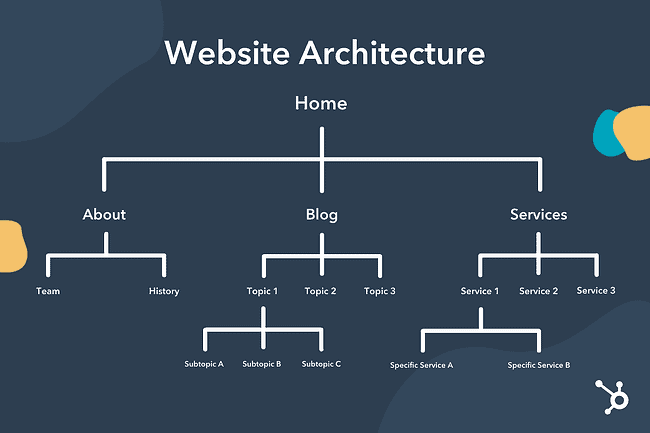
The organization of a website’s pages and content is referred to as the site structure. Search engines can more easily crawl and comprehend the content of a website before indexing it if the site structure is clear.
When creating a well-optimized site structure, there are a few crucial components to take into account, and let’s go through them one by one.
What is a sitemap?
A sitemap is a hierarchy-based list of all the web pages on a website. It could be an XML file submitted to search engines or a page on the website. Search engines can find and index all of a website’s pages with the help of sitemaps.
How you can generate a site map?
There are numerous free online tools that can generate an XML sitemap for you automatically. All you have to do is just enter the URL of your website, the tool will crawl it and generate a list of all the pages it finds.
How to submit a sitemap
You can submit your sitemap using Google Search Console with just a Google account. Just sign into your account, choose the proper property, and then click the “Sitemaps” link in the menu on the left. The sitemap URL can then be added, and you can then click “Submit.”
02. Focus on the URL structure
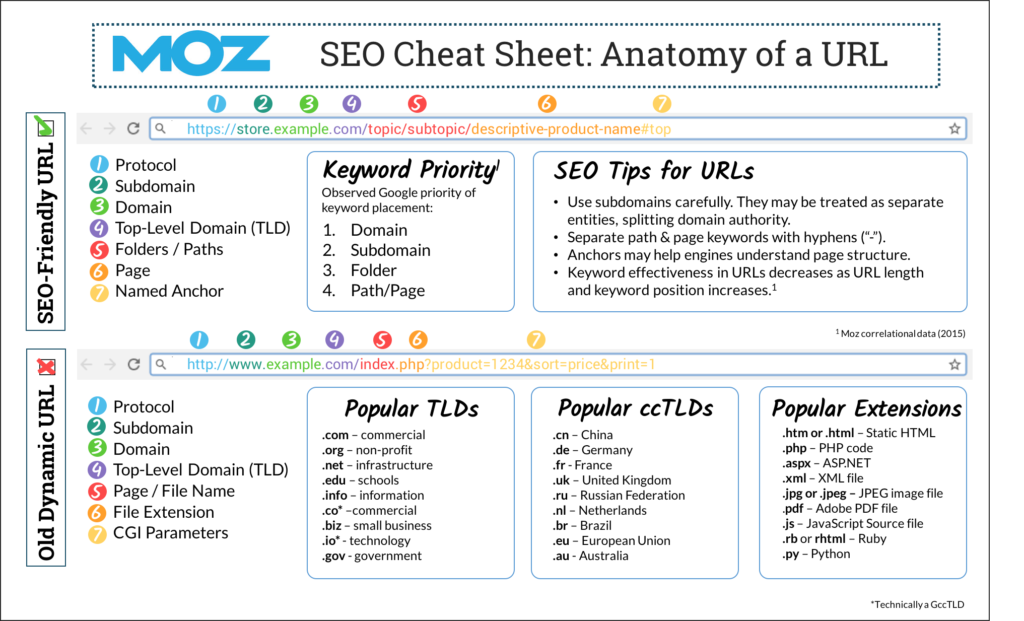
A website’s URLs for its pages should follow a logical hierarchy, be descriptive, and be simple to read. This can both enhance user experience and assist search engines in comprehending the content of a page.
03. Make Navigation Easier.
No matter how well-structured your website’s hierarchy is, difficult navigation will make it difficult for both users and search engines to access different pages.
A clear and simple navigation menu can improve a website’s user experience by making it easier for users to find the content they are looking for. It can also assist search engines in understanding the structure and content of a website, increasing the site’s visibility in search results.
In addition to the main menu, it can be helpful to include a search bar, breadcrumb trails, and footer links to aid users in finding the content they require.
04. Link your web pages internally.
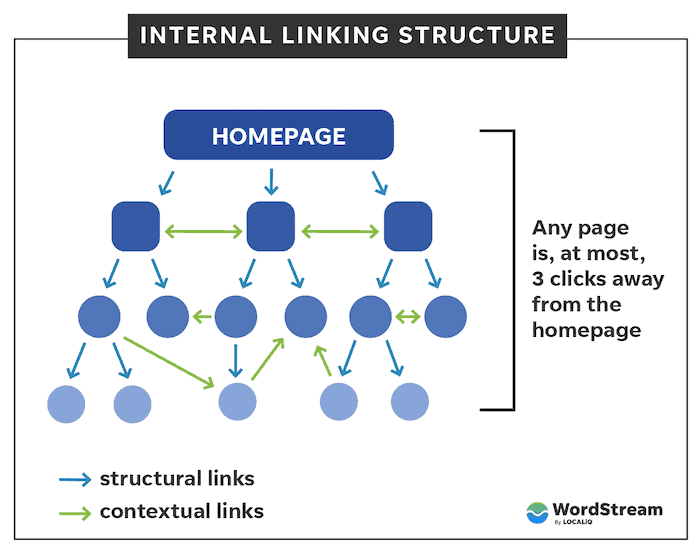
Internal links take users from one website to another within the same website. This assists search engines in understanding the relationships between various web pages, as well as users in navigating the website.
05. Add schema markup
Schema markup is a type of microdata that can be added to a website’s HTML code to provide search engines with more information about the content on the page.
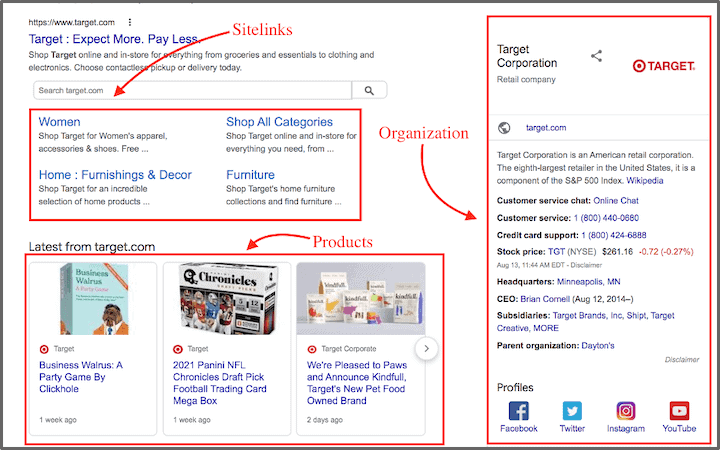
here are a few different ways to add schema markup to your website:
- Use Google’s Structured Data Markup Helper. This simple point-and-click tool highlights pertinent content on your website and adds the required schema markup.
- Use a plugin or module: There are probably plugins or modules that can help you easily add schema markup to your site if you’re using a content management system (CMS), such as WordPress or Drupal.
- Manually add the markup to your HTML: If you are familiar with HTML, you can add the necessary tags to your HTML code to manually add the schema markup to your website
No matter which approach you use, it’s critical to test your schema markup to make sure it is correctly applied and that search engines are picking it up. Google’s Structured Data Testing Tool can be used to accomplish this.
06. Get Rid of Duplicate Content
Duplicate content is content that has already been published on another website and is identical or strikingly similar. Also, If your website has multiple pages with the same content, search engines may not know which page to credit, resulting in a lower ranking for all of the pages.
Duplicate content on your website can be detrimental to your SEO in a variety of ways to avoid this you can write authentic content and use canonical URLs.
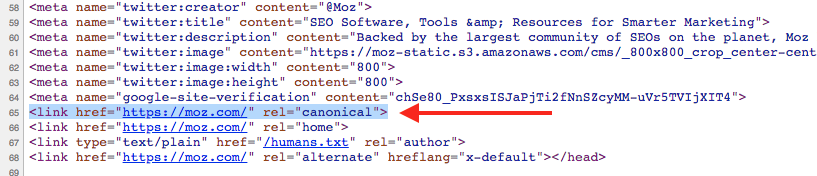
07. Use Canonical URLs when necessary.
You can tell search engines which version of the page should be regarded as the “master” copy by using canonical URLs. This aids in preventing duplicate pages from being ranked by search engines and enables them to determine which version of the page to index and rank.
08. Try to Increase the Speed of Your Website.
A slow-loading website can cause a high bounce rate (the percentage of visitors who leave your site after only viewing one page), which can harm your rankings. A website that loads quickly, on the other hand, can provide a better user experience and may rank higher in search results.
There are several methods you can try to speed up your website:
- Optimize images: Large, high-resolution images can cause your website to load slowly. Images can be optimized by compressing them or using a tool such as TinyPNG to reduce their file size.
- Reduce the number of plugins you use: Too many plugins can slow down your website, so choose wisely and consider deactivating or deleting those you don’t need.
- Enable browser caching: This allows your website to store static files in a visitor’s browser, eliminating the need for the files to be loaded from the server each time they visit your site.
- Use a content delivery network (CDN): A CDN stores static files on servers all over the world so that visitors can be served from a server closer to their location. This can speed up the loading time of your website.
- Improve your website’s code: Removing unnecessary code and minifying CSS, JavaScript, and HTML can help your website’s files to be smaller and faster.
- Consider enabling AMP – AMP is a Google-backed project that aims to speed up content delivery on mobile devices by utilizing a special code known as AMP HTML. On mobile devices, AMP versions of your web pages load extremely quickly. They accomplish this by reducing your content and code to their bare essentials, retaining text, images, and video but disabling scripts, comments, and forms.
Conclusion
Technical SEO is the process of making technical changes to a website in order to increase its visibility and position in search results.
As the name implies, it can be quite “Technical,” but there are certain steps that we can follow with proper preparation. Therefore, don’t forget to address the technical SEO side of things, as it is critical to audit and optimize its technical components on a regular basis.
